Learn how to change your XenFi hotspot name from your dashboard. Follow this quick step-by-step guide and improve your WiFi branding instantly
XenFi has introduced a new feature that allows clients to edit their hotspot name directly from the dashboard. While this may seem like a small update, it plays a key role in how users perceive and trust your network.
Your hotspot name is often the first thing users see. A clear and professional name improves recognition and credibility.
How to Change Your XenFi Hotspot Name
1. Log in to Your XenFi Dashboard, access your account using your login credentials i.e the email and the password.
2. Locate Your Hotspot Name, find the current hotspot name displayed on your dashboard. At the top left corner.
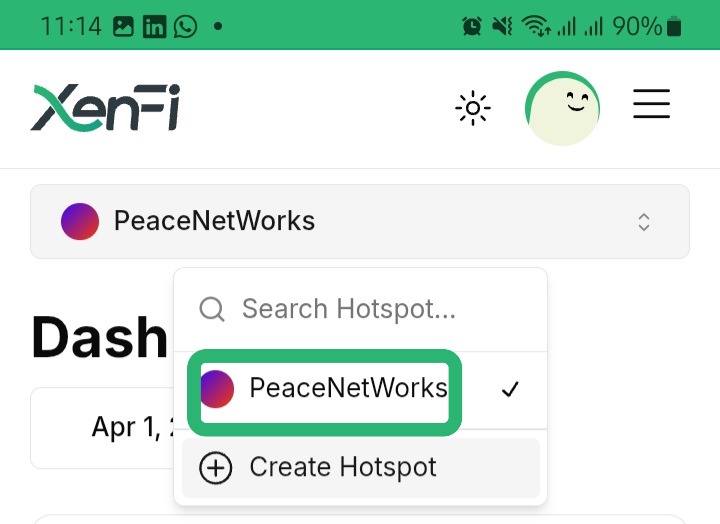
3. Click the Pencil Icon, tap the pencil (edit) icon next to the hotspot name.
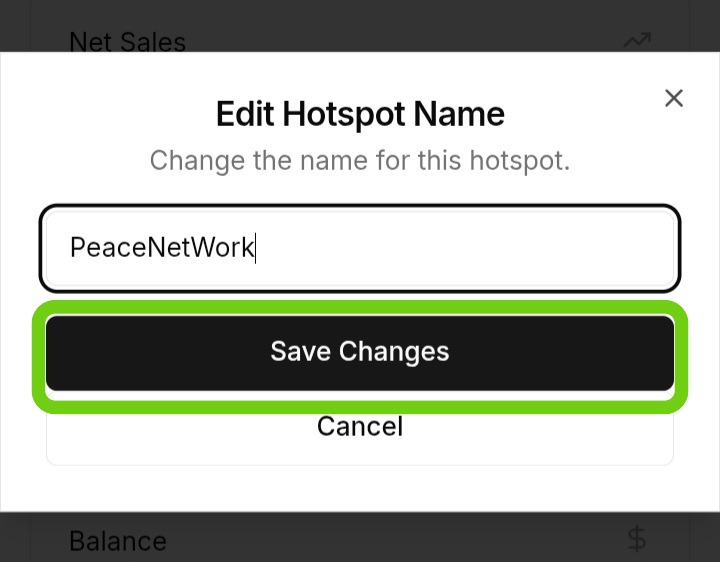
4. Edit in the Popup Window, a popup window will appear. Enter your new hotspot name.
5. Save Your Changes, click update or save. Your hotspot name will be changed instantly.
Best Practices for Choosing a Hotspot Name
Keep It Simple and Clear, avoid generic names like WiFi_1234. Choose something users can recognize.
Align With Your Brand, Your hotspot name should match your business or service identity.
Avoid Special Characters, unnecessary symbols can make your network look unprofessional.
Be Consistent, frequent changes confuse users, only update when necessary.

Changing your XenFi hotspot name is simple, but the impact is significant. A well-chosen name improves user trust and strengthens your network presence instantly. Use this feature with intention, not just convenience.
