How to use Free Trial in Mikrotik
If you run a hotspot business, here's some information for you:
People don't like paying before testing, especially when:
There are competitors nearby
They've been disappointed before
They don't know if your vouchers are worth the price
So they hesitate
And that hesitation costing you customers.
The Real Reason Some Hotspots Struggle to Grow
Most hotspot owners focus on:
Signal strength
Bandwidth speed
Router performance
But they forget something simple:
New customers don't know how good your network is.
To them, your hotspot is just another name in the WiFi list.
They don't know:
For the case of competitive areas, clients connect somewhere else because you never gave them a reason to try your service first.
Because of this, you lose a sale.
The Smart Solution: Free Trial Access
Instead of forcing users to "trust you blindly", you let your network speak for itself.
With Mikrotik's built-in trial feature, you can:
Offer 10-30 minutes of free access
Limit speed during trial
Restrict data usage
Allow daily trial (once per device per day)
Allow once-in-a-lifetime trial
It's not a loss.
It's a marketing strategy.
When Free Trial Is Extremely Powerful
If you have competitors Nearby This trial gives you advantage. Customers compare speed and if your network is stable and fast, they will buy from you.
If you just launched Your Hotspot Nobody knows you yet. A trial builds trust instantly.
If Customers Complain About Speed Trial proves confidence. It says: "We believe in our service. Try it" That builds credibility.
What This Actually Does For Your Business
Free Trial is not free internet.
It is controlled exposure
And controlled exposure that increases sales in the long run.
Step-by-Step: How to Configure Free Trial in Winbox
Open Winbox and follow these steps:
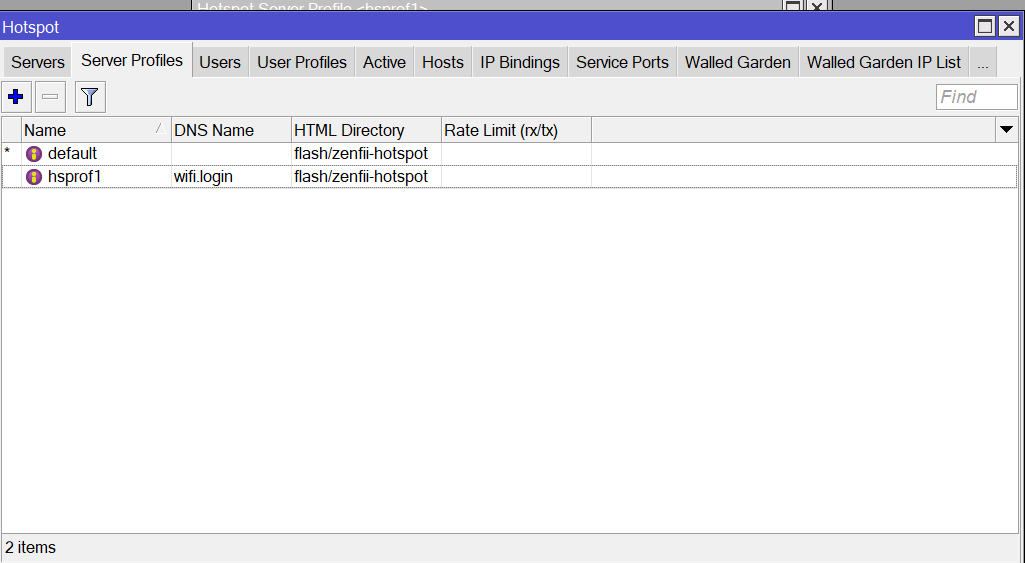
Go to IP
Then Hotspot
Select Server Profiles
Open your Hotspot Profile
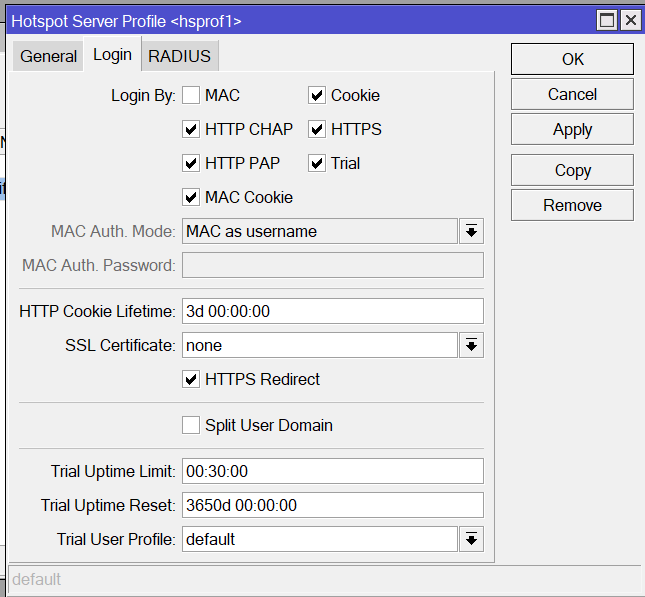
Enable Trial
Configure:
Trial Uptime: How long the client will last on the free trial(e.g. 15 minutes [00:15:00])
Trial Reset: 1d -> Trial available once per day or for a one-time lifetime trial, configure the Trial Reset field with a very high number of days (such as 3650+ days). This prevents the same device from receiving free trial again (e.g. 3650d 00:00:00)
From Free Trial to Full Growth
Free trials attract users
But what happens after they connect?
Do you know:
At XenFi, we help hotspot owners answer those questions.
Our platform helps you manage sales, track performance and scale your WiFi business with clarity and control.
Because WiFi isn't just about connectivity, it's about profitability.
